
When it comes to SEO, knowing the difference between Dofollow and Nofollow links is very important for getting found online. Dofollow links help a website’s authority and search engine rankings, while Nofollow links are meant to stop influence from being transferred.
This is how you can tell if a link is Nofollow or Dofollow:
- Right-click on the link.
- Choose “View page source.”
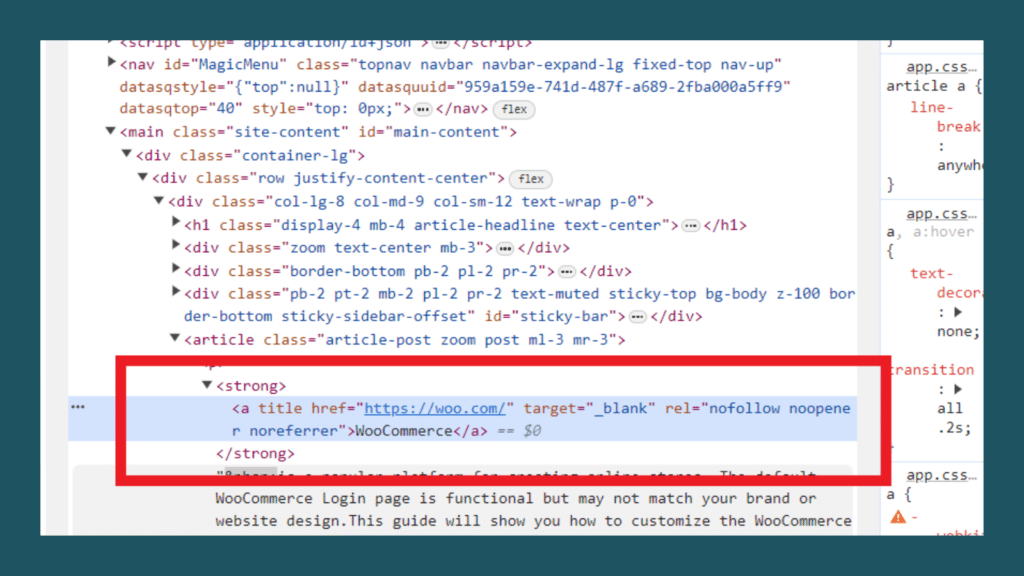
- Look for the “rel=’Nofollow’” tag in the HTML.
- If it’s there, the link is Nofollow; if not, it’s Dofollow.
This article will explore simple methods, from manual inspection to online tools, that enable users to check and decipher Dofollow and Nofollow links effortlessly. Whether you’re a website owner or an SEO enthusiast, mastering this skill, how To Check Dofollow And Nofollow Links, is essential for optimizing your online presence.
What is a Dofollow Link?
Dofollow links play a crucial role in Search Engine Optimization (SEO). These links allow search engines to follow them, passing on link juice and contributing to the target page’s authority. High-quality Dofollow links are valued for enhancing a website’s search engine rankings.
How Search Engines Treat Dofollow Links
- Search engines crawl and index the content linked through Dofollow links.
- These links are considered endorsements, and the linked page benefits from the credibility and relevance of the linking page.
- Dofollow links contribute to the overall link profile, influencing a website’s visibility in search results.
Explore Quora’s forum dedicated to “How To Check Dofollow And Nofollow Links” for practical advice and insights, connecting with a community that shares valuable tips on optimizing SEO strategies through link analysis.
What is a Nofollow Link?
Nofollow links tell search engines not to pass authority to the linked page. They are commonly used in user-generated content, comments, or links where the website owner doesn’t want to vouch for the linked content. Social media links and paid advertisements often use the Nofollow attribute.
Impact on Search Engine Rankings
- Nofollow links do not directly contribute to the linked page’s search engine rankings.
- Search engines do not follow these links for indexing purposes.
- While Nofollow links may not boost SEO instantly, they can still bring traffic and contribute to a diverse link profile.
The distinction between Dofollow and Nofollow links is essential for SEO strategy. Dofollow links pass authority and impact rankings, while Nofollow links are useful for managing endorsements and preventing unintended SEO influence.
Why Checking Dofollow and Nofollow Links is Important
Checking Dofollow links impacts SEO rankings, while Nofollow links contribute to a natural and diverse link profile. Further down, now look at its explanation:
SEO Strategy and Link Building
- Checking Dofollow and Nofollow links is crucial for a solid SEO strategy.
- Dofollow links contribute directly to a website’s authority and search engine rankings.
- Including a mix of Dofollow links in link-building efforts helps build a robust online presence.
- Nofollow links, on the other hand, allow for a balanced link profile, avoiding potential penalties from search engines.
Identifying High-Quality Backlinks
- Distinguishing between Dofollow and Nofollow links aids in identifying high-quality backlinks.
- High-quality Dofollow backlinks from reputable sources enhance a website’s credibility.
- Nofollow links, while not impacting rankings directly, can still drive valuable traffic and contribute to a diverse backlink portfolio.
- Regularly checking and assessing backlinks ensures a website’s link profile aligns with SEO goals.
Ensuring a Natural Link Profile
- Monitoring the ratio of Dofollow to Nofollow links helps maintain a natural link profile.
- Search engines favor websites with a diverse and organic link structure.
- Overemphasis on Dofollow links may appear unnatural, potentially raising red flags for search engines.
- A balanced mix of Dofollow and Nofollow links contributes to a more authentic and trustworthy online presence.
Including Warrior Forumdiscussions in this article offers clarity and resolves potential confusions, providing valuable insights and perspectives on the topic of checking Dofollow and Nofollow links.
Manual Inspection of HTML Code
A. Locating and Inspecting Links in Web Pages
- To manually find and inspect web page links, right-click on the webpage and select “Inspect” or use the keyboard shortcut (Ctrl+Shift+I for Windows, Command+Option+I for Mac).
- Look for the `<a>` HTML tag, which signifies a hyperlink, and inspect its attributes to understand the link structure.
- Links are often visible within the HTML code as text between the `<a>` tags.
B. Identifying Dofollow and Nofollow Attributes
- Within the HTML code, locate the `<a>` tag for the link you’re inspecting.
- Dofollow links don’t have a specific attribute; they are the default. If no attribute is present, the link is Dofollow.
- For Nofollow links, look for the attribute `rel= “Nofollow”` within the `<a>` tag. This attribute indicates that the link is marked as Nofollow.
C. Using Browser Developer Tools for Inspection
- Browser Developer Tools provide a user-friendly way to inspect HTML elements.
- Right-click on the element you want to inspect, select “Inspect,” or use the keyboard shortcut, and the Developer Tools panel will appear.
- Navigate to the “Elements” tab to view the HTML structure of the page.
- Locate the `<a>` tags for links and check for the absence or presence of the `rel=” Nofollow”` attribute.
Using Online Tools for Link Analysis
Link analysis tools are essential for evaluating a website’s link profile and SEO performance. These tools provide insights into backlinks, helping website owners make informed decisions about their link-building strategies:
Popular Tools for Checking Dofollow and Nofollow Links

1. Moz Open Site Explorer
Moz’s tool offers a comprehensive view of a website’s backlink profile. It distinguishes between Dofollow and Nofollow links, providing data on link quality and domain authority.
2. Ahrefs
Ahrefs is renowned for its extensive backlink database and analysis capabilities. It allows users to identify Dofollow and Nofollow links, assess anchor text distribution, and monitor link growth over time.
3. SEMrush
SEMrush offers a holistic approach to link analysis and competitor research. It helps identify Dofollow and Nofollow links, evaluate link authority, and understand a website’s overall link-building strategy.
4. Google Search Console
Google Search Console is a free tool provided by Google for web admins. While not explicitly designed for link analysis, it offers insights into the overall health of a website, including information on indexed pages and incoming links.
Step-by-Step Guide to Using These Tools
- Choose a link analysis tool based on your requirements and preferences.
- Enter the website URL or specific page you want to analyze.
- Explore the tool’s interface to find sections related to backlinks, link types, or link attributes.
- Use filters or settings to distinguish between Dofollow and Nofollow links.
- Analyze the data provided, focusing on link quality, anchor text, and overall link diversity.
- Repeat the process periodically to track changes in the website’s link profile.
Browser Extensions for Quick Checks
Browser extensions are small software modules that enhance the functionality of web browsers. Specific extensions are designed to simplify checking Dofollow and Nofollow links directly from the browser. These extensions are handy tools for quick link attribute assessments during web browsing:
Installation and Usage of Dofollow/Nofollow Browser Extensions
1. Choose a Suitable Extension
Explore popular browser extension stores (like Chrome Web Store or Firefox Add-ons) and find an extension that suits your needs for checking link attributes.
2. Installation
Click the “Add to Chrome” or “Add to Firefox” button to install the chosen extension. Follow the on-screen instructions to complete the installation process.
3. Activate the Extension
Once installed, the extension typically appears as a small icon in the browser toolbar. Click on the icon to activate the extension.
4. Inspecting Links
Visit a webpage and click on the extension icon to initiate link inspection. The extension may highlight Dofollow and Nofollow links with different colors or provide a visual indicator.
Pros and Cons of Using Browser Extensions
Pros:
- Browser extensions offer instant link attribute insights without the need for additional tools.
- They are usually easy to use, requiring minimal technical knowledge.
- Extensions provide on-the-fly analysis during regular web browsing.
Cons:
- Extensions may offer a partial analysis than dedicated link analysis tools provide.
- Some extensions are browser-specific and may not be available across all platforms.
- Users should be cautious about the permissions granted to browser extensions, considering potential privacy implications.
I hope all the concepts are now clear from what you’ve read, but I’m adding one last moz forum for your convenience – feel free to visit.
Analyzing Backlink Reports
Generating Backlink Reports
- Use dedicated link analysis tools like Ahrefs, Moz, or SEMrush to generate backlink reports.
- Input the website or specific page URL into the tool and initiate a backlink analysis.
- The tool will compile a report detailing the website’s linking to the URL and relevant metrics such as domain authority and anchor text.
Interpreting Dofollow and Nofollow Information in Reports
- In the generated backlink reports, look for a column or attribute that specifies whether the links are Dofollow or Nofollow.
- Dofollow links are typically marked as such, while Nofollow links may have a distinct designation.
- Analyze the ratio of Dofollow to Nofollow links to understand the link profile’s composition.
Making Informed Decisions Based on the Data
- Assess the quality of Dofollow links by considering domain authority, relevance, and anchor text.
- Nofollow links, while not directly impacting SEO, may contribute to referral traffic and audience engagement.
- Identify potential areas for improvement, such as acquiring more high-quality Dofollow links or adjusting anchor text strategies.
- Regularly monitor backlink reports to track changes and adapt your link-building strategy accordingly.
Conclusion
Determining if a link is Nofollow or Dofollow involves right-clicking on the browser, choosing “View page source,” and inspecting the HTML. The presence of “rel=’Nofollow’” indicates a Nofollow link, while its absence signifies a Dofollow link. This simple method lets users quickly discern link attributes for effective SEO management.